Showing posts with label Phones. Show all posts

Saturday, February 13, 2010

Android App - Slidescreen


It has been almost 2 years since I got my G1. Still love it.

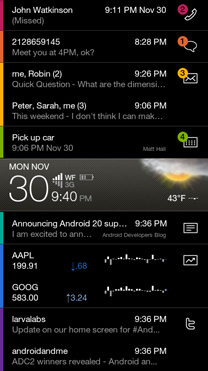
One of the reasons I love my G1/Android is the customization, especially to the "home" screen. There is a new app called slidescreen which is a home replacement. It is an "entereprise" style home screen, meaning it shows all the latest updates in your personal life on your home screen.


What you see above is what your home screen will look like. The reason it is called slidescreen is the bar in the middle slides up and down. The middle bar separates your content. On the top you have messages (text and gmail), Google calendar appointments, and phone calls. The bottom half has Google Stocks, Google Reader, twitter, and most recently Facebook.

The middle bar shows the weather of your current location (and future forecast, battery life, time, date.


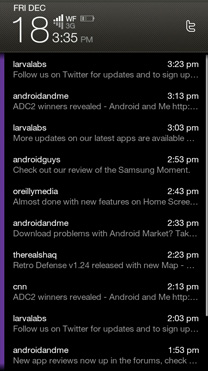
Slide the bar to the top and it filters to show all content from the section.

This is still a new app, so there are lots of new things to come, and bugs to work out. There is a free version in Android Market, and a paid version as well.

Check out more info at http://slidescreenhome.com/

Sunday, November 30, 2008

QR Codes


[Nerd]
So I have had my G1 for about a month now, loving every bit of it. One of the features on it can scan barcodes. Now the main usage in the states is you can scan any product at say Best Buy, the program will take the UPC code or whatever and do a web search for prices. You can either look at online prices and it will show you the cheapest price online and give you a link to the purchase page. Or you can do a local search and it will look at all stores near your GPS area and put it on google maps with prices. You can also put in price points so that it will alert you when the product is at the price you want it.

Now thats is not the coolest part of barcode scanning. The best part is QR Codes or 2D Barcodes. You don't see them in the US much at all, but in Japan you see them all over. I think one of the first phones to feature it was the Nokia Rob was trying to buy when Cloverfield came out. 


So as odd as that thing looks it contains information. It can contain a link to a number to call, or a number to text, it can also display text such as instructions, or a nice message. It can also contain a web url, the above is a link to this blog, on the G1 you simply open the barcode scanner then scan and click the link and it brings you here. If you go to Japan you will see these all over, you probably have seen them in Japanese magazines, or on some blog sites.

I hope more phone makers begin adding this function to their phones and it will get used more in the US.

[/Nerd]

And Clash with what looks to be another great video on the way.


RED BULL DRIFTING WORLD CHAMPIONSHIP Teaser from Clashproduction on Vimeo.

Monday, November 17, 2008

Imeem

Whether or not you love Kanye West, you should love imeem. I especially love it because it is on my phone (I finally got my G1), and it's linked to my imeem account, so makes for a great streaming music app!

Now for music.


DJ Benzi, Kanye West & Plain Pat present: Sky High

Sunday, October 26, 2008

G Phone

I recently broke my Blackberry, the last few days without it have been hell. I ordered a G1 though, it came out earlier this week, but I won't get mine till Nov 10th.

What is a G1? To most its just a knockoff of an IPhone with a keyboard, but it is very different. So it obviously is a touch screen phone, it has a slide out keyboard like a sidekick. The lack of a real keyboard was what I hated most about the iphone. The big thing about it is it runs on an OS called Android, which is an open source OS, so for geeks it means you can basically create any application for it without having to cut corners and make illegal shit. So in general on the software side it is limitless. The G comes from Google, so you know it has big potential.

Mo got his a few days ago so I had a chance to mess with it. First impressions is it feels good. My big quirk about the iphone vs. my blackberry was although it was thinner it never fealt right in my hand. G1 feels like a phone, its a little bulkier, but not as wide, and just as tall as the iphone. 

Now to get away from the iphone vs. g1 talk, the G1 has some great apps. I only played with some for a breif time and read about them. Some of my favorites include ShopSavvy, CompareEverywhere,  or GoCart. In general they ar
e all the same, they let you scan a barcode which brings up the product. Then it searches for online prices, then you can go direct to the site and buy, or it searches local stores, then integrates locations on google maps. One of them even has the option to set a price point, the app will alert you when the price goes below it!

Some other cool apps include Locale, lets you set area
s in which your phone will do different things. For instance, say you are within 100 feet of a certain addy, such as your work, the phjoen will automatically change to vibrate, then swithc back when done!

For all you Imeem users, it also has that so you can stream music live on your phone. And the one app that is more of a gimmick but cool none the less, is compass mode in google maps. Basically when you are in street view and compass mode is on, you can move the phone, up and down, side to side and the image you are viewing in
 street view will move with you. Coupled with 3G it loads really fast. 

When I get it I will post a real review...